Thursday, December 8, 2011

Work Progress - Dec 7 - Dec 14

This is the 99th post of my pCSDT work.

Work done:
* Improved button group layout of AF tool (See here)


* Core upgraded to v0.41
** Change the definition of scale (now it is number of pixel per unit).
** Both x and y axes use the same scale.
** Instead of specifying min and max for each axis, one needs to set up a range of value that an axis spans. The program will compute the respective min and max from translate_x and translate_y which tells the relative translation of the origin. -1 and 1 are the values for the two opposite edges.
** Fix aspect ratio of pCSDT tool. Changing the canvas dimension does not distort the grid. The grid drawing is now made to the whole visible area of the simulation canvas (see CC and GG), unless one sets bDrawGridBeyongRange to false (SB).


Wednesday, November 30, 2011

Work Progress - Nov 30 - Dec 6

Demo: "SB in beta" link above

Work done:
* Skateboarder's "Word to yell" sensor


* improved local deployment -- By putting local resources in local jar files and include them as jar resource in the JNLP file, we can load local resources on both local computers and the web without specifying any absolute path.

In progress:
* aspect ratio control -- need to resize the canvas once the stage boundary changes

TO DO:
* Check casting - for binary op, the logic is at PVariant.Assign(lhs, op, rhs)
* disable during play - optional

Wednesday, November 16, 2011

Work Progress - Nov 16 - Nov 29

Demo: "Stable SB app" above

Done:
* Include description of new Core features in pCSDT doc.
* Introduce a few more operator codelets, including AND and OR.


* AF tool - merge fixed in one version of AF tool to the one in the repository, fix Flash problem on Firefox
* Introduce proper type casting in method codelet. The script below now parses the theta value of type float with a method expecting String input properly and display the theta value as expected.


TODO:
* Improved local deployment (avoid the need to specify absolute locations in .html and .jnlp files if possible)
* Aspect ratio of the grid

Thursday, November 10, 2011

Work Progress - Nov 9 - Nov 15

Demo: "Stable SB app" link above

Work done: Finish drop-down menu. The sample script asks the skateboarder to yell after pressing "a" key. On contacting Arc5, the yell message is changed to "Reaching Arc5". On reaching the edge, it sends a message "Stop" to the stage. When the stage receives that message, it will stop the simulation.


  • The pull-down menu is forbidden from being replaced and dragged away.
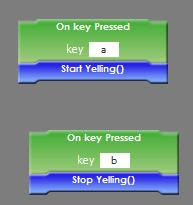
  • The script can be loaded correctly. You may check this out by pressing "a" key to ask the skateboarder to yell and pressing "b" to ask the skateboarder to stop yelling. This script is made by the "Save As" feature of the program. This means the save feature has also been implemented correctly.
  • Changing the order of the objects in the object manager doesn't change the currently selected object in the drop-down menu. To test it out, change the object order in the object manager with the up and down arrows and then start the simulation. Everything should be the same.
  • Changing the name of an object will trigger the respective name in the pull-down menu to change. To test it out, make sure the object "Jessie" is selected. Change the selected item of a pull-down menu in the scriptlet panel to be "Jessie". Then change the name of Jessie to something else. The pull-down menu should now display the new name.
Programmer note:
  • One can set a static list as the respective ArgVal using the [...] syntax. For example, in Skateboarder.java of SB app,
    @AutomatableEventList(name="On key Pressed", desc="Fired when a key is pressed", argNames={"key"}, argDesc={""}, argTypes={"String"}, argVals={"[a,b,c,d,e,f,g]"})
    public PEventList ekeyPressed = new PEventList(this);
  • We have an example dynamic list (fill in "@ValueListObjectNames" in the argVals field) that essentially pull the list of values from a class method. For example, in PObjectJBox2d.java of SB app,
    @AutomatableEventList(name="On Touching", desc="Fired when it is touching something", argNames={""}, argDesc={""}, argTypes={"PObject"}, argVals={"@ValueListObjectNames"})
    public PEventList eTouching = new PEventList(this);
  • It is also possible for an application to implement their own dynamic lists. In that case, one needs to extend from AbstractValueList to define the function used to generate the list of values. He then needs to extend from AbstractStatementFactory to define the key String and PType value that are necessary to trigger the production of the respective PStatementDynamicConst. Finally, in the Engine class of his own application, he needs to instantiate the respective Statement Factory and call Engine.AttachStatementFactory(.) to include the factory into consideration. Have a look at ValueListObjectNames.java and StatementFactoryCloning.java for an example.

Wednesday, November 2, 2011

Work Progress - Nov 2 - Nov 8

Progress:
* Drop down for pre-defined items -- still need to fix a few problems such as selected item consistency on changing object order, load and save, and avoiding it from being replaced by other codelets.


TODO:
* aspect ratio of the grid should be fixed for whatever dimension of the simulation window
* grid should automatically extend to the whole window area
* On new hit -> on new contact
* On contact, on new hit: include object hit as argument

Wednesday, October 26, 2011

Work Progress - Oct 26 - Nov 1

Demo: "stable SB app" above

Work done
* Hide the timer when it is not necessary
* If angular increment < 5, show an error message.
* "On outside stage" event added to Skateboarder object. It is triggered when the skateboarder is outside the rectangle spanned by the points (minx, maxx) and (miny, maxy) of the Stage/Background object.
* Message similar to MIT Scratch: "Broadcast message" method, "Send meesage" method, "On Receive message", On Receive message From" event. Try to load this for a demo use case. When the skateboarder is outside the stage area, a "Stop" message is broadcast. When the stage receives the "Stop" message, it will stop the simulation.

Scripts for the skateboarder

Script for the stage

Wednesday, October 19, 2011

Work Progress - Oct 19 - Oct 25

Demo: "Stable SB app" above

Done:
* parameterized event codelet
Code example (SB.Skateboarder)
@AutomatableEventList(name="On key Pressed", desc="Fired when a key is pressed", argNames={"key"}, argDesc={""}, argTypes={"String"}, argVals={"a"})
public PEventList ekeyPressed = new PEventList(this);

One should provide one or more PEventInvokeVerifier to the PEventList to help the PEvent make use of the input arguments. In the above example, we add the following in the Skateboarder's constructor
ekeyPressed.AttachInvokeVerifier(new KeyPressedPEventInvokeVerifier());
where KeyPressedPEventInvokeVerifier implements IEventInvokeVerifier, the following method of which does the job.
public boolean VerifyInvoke(PEvent e, Object... params);
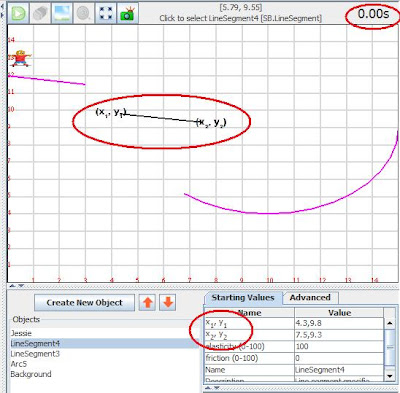
* (x1,y1) subscript, parentheses. For an AutomatableProperty, one can now use the additional DisplayName field to suggest the HTML-formatted field name shown in the InitialPropertyManager. If that DisplayName field is not specified, we will take the value specified in the name field. Also, the description field also supports the use of HTML tags to format.
@AutomatableProperty(name="x1,y1", DisplayName="x1, y1", desc="x1, y1", DesignTimeBehavior="B", RunTimeBehavior="H")
public String p1;

* timer - bigger, higher contrast

* Fix the bug that on switching between basic and advanced tab, the desc doesn't change accordingly.
* Fix the bug that traces of codelet are left behind when dragging the codelet in Scriptlet panel.

To do:
* Hide the timer when it is not necessary
* Pull-down selection codelet (detect when to hit boundary)
* Messaging as in MIT Scratch
* Disable various editing panels during simulation
* instantaneous change of display on changing starting values
* Tutorial info window
* Capability to access other objects' sensors and methods, perhaps with a pull-down menu
* not distort the aspect ratio when enlarging the view
* Changing window view angle -- with Jed
* fractal sketching tool -- combine the two versions

My own list:
* Implement AND/OR codelet
* Possible improved texture loading routine -- currently it seems every object keeps its own texture. Should make it class-wise.
* Procedure vs function
* moving is not smooth in scriptlet window

Tuesday, October 18, 2011

Work Progress - Oct 12 - Oct 18

* Upload doc to repository. Add link at the top of this blog.
* Continue working on introducing parameters to event codelet

Wednesday, October 5, 2011

Work Progress - Oct 5 - Oct 11

Demo: "Stable SB app" link above
Done:
* Fix the bug that the scripts of the selected object is not shown up on loading an XML file
* Fix the bug concerning ghost holder. The problem arose when one inserts a codelet into an empty conditional hold of a control codelet (e.g. if... then...). In that case, a ghost codelet holder was created, causing the problem.
* Implement read-only sensing properties (i.e. its value can't be modified by assignment statement). To specify a property to be a read-only property (instead of editable/assignable property), change the value assigned to RunTimeBehavior from "E" to "R" as shown below.
@AutomatableProperty(name="y", desc="y coordinate of current skateboarder position", DesignTimeBehavior="H", RunTimeBehavior="R")
public float m_y;
They are displayed as orange rectangles. Those read-only properties can be put in any rectangular holes, except the left hand side of any assignment statement.


* Add time sensing property for all objects. It is indeed from the engine's corresponding property in every simulation step.


TODO:
* parameters for event codelets
* messaging similar to Scratch
* pull-down menu to select sensing property, object name, etc

Wednesday, September 28, 2011

Work Progress - Sept 28 - Oct 4

Demo: "Stable SB app" link above

Done:
* Further updated deployment package here. Demonstrate the use of version folder for apps as well. Also fix a bug for Mac OSX deployment (due to Bill)
* Timer - time display at top right of simulation window, "Time elapsed" sensing variable for the Engine class. Note one can use the Engine's advanced property "Speedup Factor" to speed up/slow down the simulation clock.

* Take away yell-related variable from Skateboarder's sensing tab

* Stop programmatically - try building the following script for the Engine (Stage) class and see.


TODO:
* Collision sensing (drop down to detect who is colliding)

Wednesday, September 21, 2011

Work Progress - Sept 21 - Sept 27

Done:
* Complete the online "Responsible Conduct of Research Training" course
* [Deployment package version 1.1] Move all OpenGL supporting jar files to application folders. The package has already been distributed to application developers. (Stable GG app above is using this deployment package)
* [Deployment package version 1.2] Put Core and the OpenGL supporting jars files in a folder different from the application-specific jars. This simplifies the application programmers' work on deploying their apps. They need not worry about minor changes in the Core. The program will automatically grab the latest Core to use from the separated Core/ folder, updated by Core developers. Previously, they need to grab and upload the Core jar files to their application web folder. (Stable SB app and CC2 app are using this deployment package.)

Root of the deployment package -
the app (CC2, SB), Core, OpenGL supporting jars are located in separate folders.

Content of an application web folder -
contains only the jar files directly related to the application only

* The deployment package v1.2 is also capable of running offline without any local web server. Download that package. Double click on CC2/index.html or CC2/app.jnlp to check it out.

TODO:
* Some bug fix in writing JNLP info to the XML save file.

Friday, September 16, 2011

Work Progress - Sept 14 - Sept 20

Demo: Stable SB app above

Work done

Wednesday, August 3, 2011

Work Progress - Aug 3 - Aug 9

Work done:
* Use the ordering in Object manager to decide the drawing order of the objects. Objects on the top of the list will be put on top of others in the simulation window. A newly-created object is put on top of the existing objects. Also provide facilities for user to change the order of objects in Object manager.
* Write Core and app jar file name to the saved XML file. This allows the community site to know the appropriate Core and app jar files to load. (New version of the Core/app jars may not be compatible to the XML files saved using an old Core/app. So we need to tell in the XML file the right version of Core/app that its supports.)
* Help Varun fix the hissing sound problem
* Fix the bug that the scriplet window doesn't provide a scrollbar when it is loaded with a long script.
* Port the existing GG app to latest Core with Graphics2D engine.

Suggestions in last meeting:
* Limit the number of iterations done for each loop
* Drag on empty area -> change camera location
* Goal image window (to be done by Bill)

P.S. I'll go for a vacation starting Aug 11. I'll be back on Sept 14.

Tuesday, August 2, 2011

Work Progress - Jul 27 - Aug 2

Demo: "SB in beta" link above

Work done
* Modify the pCSDT core according to Patrick's suggestion - allows a jnlp file to use the "SingleDemoXmlUrl" parameter to specify a single xml file to be loaded.
* Offer a template of an pCSDT app that allows its simulation view to be drawn in 3D.
* same color for both the variable/property codelets and the respective holes.
* rename "comparison" to "operators"
* fix the bug that a number string can't be assigned to a string field.
* Move variable codelet to a separate "variable" tab

Still working
* Use the order of the objects in the object manager to decide their respective drawing sequence in each frame. (ref)
* Porting GG app to latest Core
* Move the 3D world display capability to the Core.

Wednesday, July 20, 2011

Work Progress - July 20 - Jul 26

Work done:
* Eliminate spacing and underscore in the default name of all objects.
* Help Bill and Joe in their pCSDT programming problems

To do:
* Use order of objects in Object Panel to determine the drawing order (Ref: 1, 2, 3)
* Graphics2D engine

Friday, July 15, 2011

Work Progress - July 13 - Jul 19

Demo: "SB in beta" link above

* Core: In JPnlObjMgr, use ToolTipText to indicate the type of an object.
* SB: Fix the bug that all skateboarder objects share the same set of texture, even if we specify different looks for different skateboarders.
* Core: An additional basic property "z" is added for all PObjects. We can use that to control the drawing order of overlapping object. An object with a higher z number will appear on top of others with smaller z numbers.
* Make self-defined variables as a property of the object. An assignment statement can now take a variable or a property in its LHS.

Wednesday, July 6, 2011

Work Progress - July 6 - Jul 12

Demo: "SB in beta" link above

Work done:
* Disallow the background to be selected through the simulation window
* Change the name of the Background to Stage.
* Set different positions for newly-created skateboarder objects
* "Lanuch Object()" method is renamed to "Call Object()"
* Eliminate underscore from the names of newly-created objects. Also eliminate the uppercase in the name (i.e. "Object_5" -> "object 5")
* Introduce a titleborder in the JPnlObjMgr class so as to indicate which part is the name and which part is the type of an object in its list.
* Investigating GLJPanel VS GLCanvas. The slow execution of pCSDT app using OpenGL graphics engine may be due to the use of GLJPanel rather than GLCanvas. See here and here for the relevant literature.
** Experimenting replacing GLJPanel with GLCanvas (finally find out that it doesn't help at all on machines in VCC south, but just the Linux machine in my lab)
** Enabling Java2D OpenGL pipeline (isn't stable)

In Progress:
* Update GG app

Thursday, June 30, 2011

Work Progress - Jun 30 - Jul 5

Demo: "Stable SB app" link above

Work done:
* When we are replacing a conditional statement with another, the original one is "displaced" rather than disappears (suggested by Bill). See the following series of shots for an example.

* Improved codelet insertion: we now check all the four corners of a codelet to determine if it should be inserted into a location. The following shows an example, in which the property codelet is allowed to be inserted because its bottom right corner is inside the left box of the binary expression. It is not possible in the previous core, in which we just checked the top left corner.

* Allow hardware-demanding OpenGL operations like anti-aliasing and texture loading to be disabled (through the advanced property "Better Graphics?" in the Engine/Background class) to adapt to low-end systems

Friday, June 24, 2011

Work Progress - Jun 22 - Jun 28

Demo: "Stable SB app" link above

* Fix the texture disappearance problem in CC - the root cause is that the reshape() function (which is called when there is any resizing event) in PEngineOgl class reloads the texture (calls LoadTextures()) of PObjects added via "Create New Object" button only (which is stored in PEngine's objs Vector). The plaitimages that are created using CC's Duplicate() method are not PObject and they are not added via the above approach. I fix this problem by overriding CCGui's reshape() method to also reload the plaitimages' texture as well.
* Fix the CC bug that the plait doesn't return to its initial position on erase drawing.
* Fix the Core bug that Duplicating object can't duplicate the events.
* Fix the Core bug that deleting an object doesn't switch to default object. BTW, duplicating object now switch the selected object to the duplicated one.
* Core: one can now scale the dimensions separately with PEngine's advanced properties x_scale, y_scale and z_scale.
* Fix the bug that the selected object specified in an XML file is not correctly loaded.
* Allow background color to be specified in the "Set Background" window.
* Core: The PLAY button flashes on first launch of the application.

Thursday, June 16, 2011

Work Progress - Jun 15 - Jun 21

Demo: "SB in beta" link above

Work done:
* Allow multiple event codelets of the same name in the same object. The y location (x location and then z location if there is a tie) of the codelet will determine the execution sequence of the event codelets. As an example, load this xml script. Change the relative locations of the two codelets to see the effect. (Note: one can no longer hide any scripts)
* Core: auto-expand the scriptlet window. Try pulling a scriptlet to a position at which the script cannot be fully displayed. The scriptlet window expands accordingly.
* Fix the bug that one can't edit the properties of some PObject (which inherits the superclass' Reset() method) after doing a simulation.
* Fix the bug that one can't select a plait object on the simulation canvas in the CC app.
* Allow adjustment of the number of decimal points to be shown for grid axis numbers (as an advanced property of the engine object).
* Core: On "EXPAND GRAPHIC VIEW" then "REDUCE GRAPHIC VIEW", the splitters restores just before they hit the “expand” button.